Required API key scopes
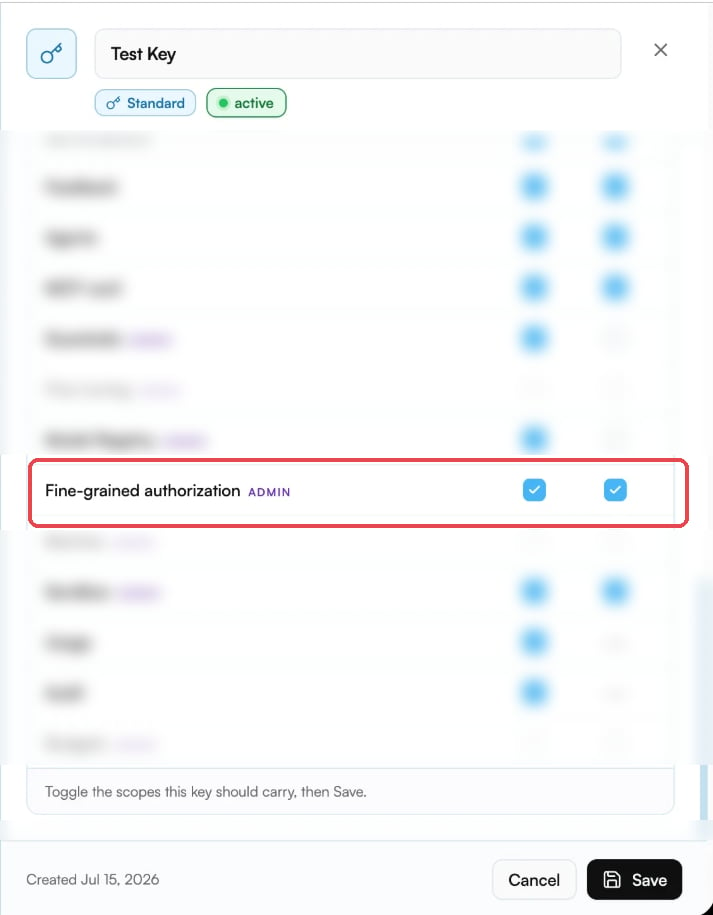
API keys carry a fixed set of scopes, and the fine-grained authorization scopes are not part of every key by default:
Both are admin scopes — only organization admins can enable them on an API key.
If you’re not an admin, the toggles aren’t available to you: ask an admin to issue you a key with these scopes, or to add them to your existing key.
If your key is missing a scope, the API rejects the request before any ownership check happens:
Enable the scopes in the platform console
As an organization admin, you can create a key with these scopes, or add them to an existing key, at platform.mka1.com/admin/api-keys:- In the console, go to Access → API Keys.
- Create a new key, or open an existing key to edit it.
- In the scope list, find the Fine-grained authorization row and enable both checkboxes (read and write).
- Click Save.
How resource authorization works
Every LLM resource (completion, file, vector store, conversation, response, or skill) can have per-user roles assigned to it. Three roles form a strict hierarchy:
Resource IDs are created when you make LLM API calls.
For example, creating a conversation returns a
conv_ ID, creating a response returns a resp_ ID, and uploading a file returns a file_ ID.
The authenticated caller (or the end user specified via X-On-Behalf-Of) automatically becomes the owner of that resource.
Use the returned resource ID with the authorization endpoints below to manage access for other users.
Only owners can grant or revoke roles.
If a non-owner attempts to grant or revoke, the API returns 403 Forbidden.
These authorizations are enforced by the MKA1 backend on every request.
Any attempt to read, modify, or delete a resource that the caller does not have access to is rejected with an appropriate error response.
You can also grant public access by using ”*” as the user ID, but only for writer or reader roles.
Set up: create a resource as Alice
The examples in this guide build on each other and use two end users:- Alice (
user_alice) creates a conversation, which makes her its owner. - Bob (
user_bob) is granted access, exercises it, and has it revoked.
X-On-Behalf-Of header controls which end user a call acts as.
Start by creating a conversation as Alice and capturing its ID — every snippet below uses it:
Grant, check, and revoke only work against a real resource ID that the acting user owns.
Two common mistakes produce a
403 Forbidden “is not an owner” error: passing a made-up ID (like conv-abc-123), or omitting X-On-Behalf-Of — without it the call acts as the API key’s own service user, not as Alice.Grant a role to a user
UsePOST /api/v1/authorization/llm/grant to assign a role to a user on a resource.
The caller must be the resource owner, so Alice does the granting:
204 No Content.
The resourceType must be one of: completion, file, vector_store, conversation, response, or skill.
The role must be one of: owner, writer, or reader.
Check a user’s permission
UseGET /api/v1/authorization/llm/check to verify whether the authenticated caller has a specific role on a resource.
The response contains an allowed boolean.
Here Bob — who was just granted reader — checks his own access:
reader or writer check.
Revoke a role
UsePOST /api/v1/authorization/llm/revoke to remove a role from a user.
Only the resource owner can revoke, so Alice removes Bob’s access:
204 No Content.
Grant public access
Grant a role to all authenticated users by settinguserId to ”*”.
Public access is restricted to writer and reader roles — you cannot make someone a public owner.
As with any grant, the caller must be the resource owner (Alice):
Handle authorization errors
The authorization endpoints return403 Forbidden for two distinct reasons — check the message to tell them apart.
The API key is missing a required scope. The request is rejected before any ownership check.
Fix this by enabling the fine-grained authorization scopes on your key — see Required API key scopes.
- The resource ID doesn’t exist — you must create the resource first and use its real ID; placeholder IDs are rejected as not-owned.
X-On-Behalf-Ofis missing — the call then acts as the API key’s own service user (the opaque user ID in the message above), not as the end user who owns the resource.
End-to-end example: two users with different roles
This walkthrough demonstrates distinct user profiles with differentiated permissions. Alice creates a conversation (becoming its owner), then grants read access to Bob. We verify that Bob can read but cannot write, and that Bob cannot grant permissions to others.Next steps
- Review the Authentication guide for API key and JWT usage.
- API Reference for the authorization endpoints:
POST /api/v1/authorization/llm/grant— Grant a rolePOST /api/v1/authorization/llm/revoke— Revoke a roleGET /api/v1/authorization/llm/check— Check permission