Navigate the console
Take a minute to get your bearings. The left sidebar groups every surface into Access, LLM, Agents, and Admin. Settings, with its Account and Preferences tabs, lives in the user menu at the bottom of the sidebar rather than in a group. Owners and admins see every section by default. Members see a trimmed sidebar (API Keys, Usage, and Playground) and can turn on more sections under Settings → Preferences. Here’s what each section is for. You’ll use several of them in the steps ahead.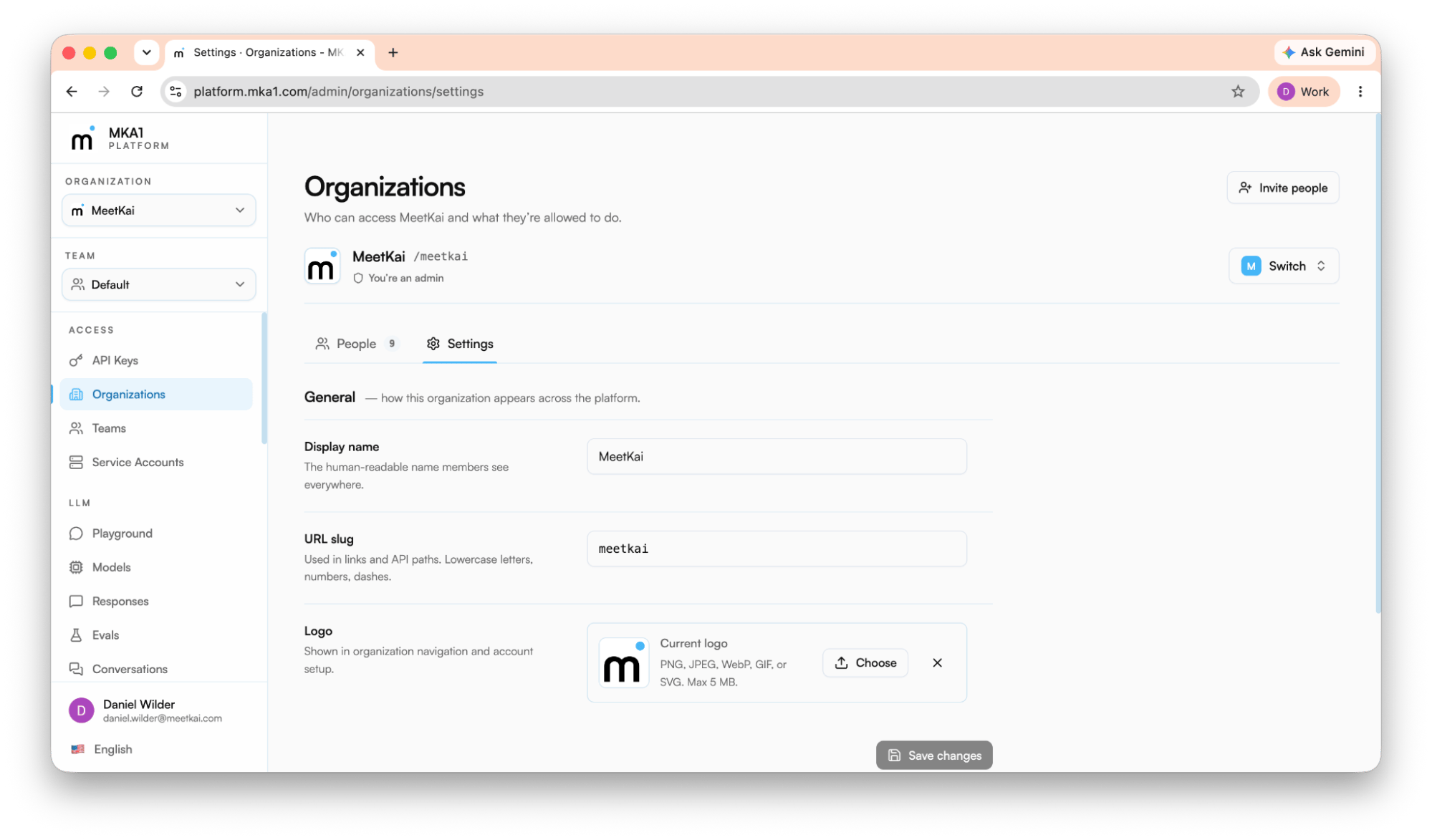
Access
| Section | What you do there |
|---|---|
| API Keys | Create and manage the authentication keys your code uses (API keys). |
| Organizations | Manage members, roles, teams, and pending invites. |
| Teams | Create teams and manage their membership. Every API key is scoped to one team. |
| Service Accounts | Create non-human identities for production and attach them to teams. |
LLM
| Section | What you do there |
|---|---|
| Playground | Chat with models interactively. Stream responses in real time. Configure tools, skills, and guardrails, with an advanced-settings drawer. |
| Coding Harness | Run managed, sandboxed coding-agent sessions, with an optional GitHub repository connection. Appears only when your deployment enables it. |
| Models | Browse the models available through the gateway, filter them by modality, and inspect registry details as an admin. |
| Responses | Create individual responses and inspect stored history, output, tool calls, and token usage. |
| Evaluations | Build evaluations and launch durable runs to measure model quality. Open an evaluation for its leaderboard, which ranks models across runs, and a compare page that sets two models’ answers side by side (Compare models). |
| Conversations | Create and inspect stored conversation state, searchable by metadata. |
| Text to speech | Synthesize speech from text and inspect the generation history. |
| Speech to text | Transcribe audio to text and inspect the transcription history. |
| Prompts | Create, version, and roll back reusable prompt templates with {{variables}}. |
| Guardrails | Configure banned-words, prompt-injection, and leakage policies, then test them. |
| Files | Upload, inspect, and delete files used by LLM workflows. |
| Vector Stores | Create stores, attach files, and search indexed document chunks for retrieval (RAG). |
| Feedback | Record and update human feedback on model output; look records up or export a parquet snapshot. |
| Skills | Upload, version, and manage reusable skills, each packaged behind a SKILL.md manifest. |
| MCP Servers | Register MCP server definitions that saved agents can attach as tools; secrets stay in Credentials. |
| Credentials | Store the secrets your MCP servers and integrations need, kept separate from their definitions. |
Agents
| Section | What you do there |
|---|---|
| Quickstart | Stand up a saved agent fast - pick a model, write instructions, attach tools, and run it. |
| Agents | Create and run saved agents that bundle a model, instructions, tools, and metadata. |
| Runs | Trace and debug agent runs. Review the stored transcript and raw JSON. Raw events stream only while a run is active. |
| Memory Stores | Browse the markdown memories agents read and write across runs. |
Admin
| Section | What you do there |
|---|---|
| Audit | Review gateway audit requests, build cases, and export responses (cluster admins see every organization; organization admins see their org’s activity). Every tab exports CSV or JSON. |
| Alerts | Register webhook endpoints that fire when responses fail, scoped to the cluster, an organization, or a team. |
| Model Registry | Manage the models your organization can resolve. Tabs: Models (the full catalog with each entry’s source and activation state, plus an Activate button), Auto models (per-endpoint overrides for auto), Add model, and Raw JSON. |
| Pricing | Maintain the model price book: cluster currency, per-model prices, and per-organization overrides (cluster admins only). |
| Budgets | Cap and track spend per organization and per member, with alert and block thresholds. Cluster admins also budget individual API keys. |
| Usage | Review token, request, and storage usage. Admins see the organization and its teams. Members get a Usage entry of their own in the trimmed sidebar, showing only their requests. |
| Compute | Run GPU services and jobs from templates such as Fine-tune job and OpenAI-compatible server. Until a cluster admin enables compute for your organization, the page shows a request-access notice instead. |
| Repositories | Store model weights and datasets in git repositories. Scoped to the organization, and gated behind the same compute enablement. |